Working remotely? Well, lets focus on the right tools

Working remotely? Well, lets focus on the right tools

Let’s face it, for a lot of us that have been working remotely there has been a bit of trial and error in getting our systems right.
For most of us the software and platforms that we use daily have greatly aided in the transition.
However some of the smaller building blocks of our remote setups can cause some mighty big problems.

Conferencing hardware… we are all using it.
A headset, a microphone and a video camera. Such simple devices and yet sometimes… sometimes they can lead to some pretty big frustrations. We know, our support crew have heard your frustrations.

And that is why we at GPK have put together our picks for your remote office / conferencing requirements.
We’ve put together some packages from market leaders Jabra and Logitech that we think could serve you well now and in the future.

All our communications bundles are fit for purpose, are perfect for working remotely, play nicely with collaboration software and are perfect for video conferences. Having the right voice and video conferencing equipment is step in the right direction.

Premium Wireless Headset Bundle

Jabra Evolve2 85 Stereo Headset
Engineered to keep you focused. The best headset for concentration and collaboration.

Logitech Brio
4K ultra high-def camera offers 5x digital zoom, high frame rates, outstanding low-light performance

Wireless Headset Bundle

Jabra Evolve2 65 Stereo Headset
Engineered to keep you agile. Work anywhere with superior wireless audio performance.Logitech C930e
Designed for business, a 1080p webcam with wide field of view and digital zoom

Wired Headset Bundle

Jabra Evolve2 40 Stereo Headset
Engineered to keep you on task. Exceptional audio, outstanding noise isolation, superior comfort.

Logitech C930e
Designed for business, a 1080p webcam with wide field of view and digital zoom

Merry Christmas! Christmas Operating Hours (Melbourne, Brisbane and Adelaide)

Melbourne 

Our business hours this holiday period are:

Mon 24th Dec:  Closed
Tuesday 25th Dec: Closed
Wed 26th Dec: Closed
Thu 27th Dec:    Open Business Hours
Fri 28th Dec:      Open Business Hours
Mon 31st Dec:   Closed
Tues the 1st Jan: Closed
Wed 2nd Jan:     Open Business Hours


Brisbane 

Our business hours this holiday period are:

Mon 24th Dec:  Closed
Tuesday 25th Dec: Closed
Wed 26th Dec: Closed
Thu 27th Dec:    Open Business Hours
Fri 28th Dec:      Open Business Hours
Mon 31st Dec:   Closed
Tues the 1st Jan: Closed
Wen 2nd Jan:     Open Business Hours


Adelaide 

Our business hours this holiday period are:

Thurs 20th Dec: Open till 1 pm – Telephone Support only available after 1pm
Fri 21st Dec: Open Business hours Phone support
Mon 24th Dec:  Closed
Tuesday 25th Dec: Closed
Wed 26th Dec: Closed
Thu 27th Dec:    Open Business hours Phone support
Fri 28th Dec:      Open Business hours Phone support
Mon 31st Dec:   Closed
Tuesday the 1st Jan: Closed
Wed 2nd Jan:     Open Business hours
Thurs 3rd Jan:   Open Business hours
Friday 4th Jan:  Open Business hours

During The holiday period we will be running skeleton staff.  During The holiday period we will be running skeleton staff.  Please be aware there may be a wait for non-emergency services.

For our new customers coming on-board in Adelaide we look forward to continuing our working relationship and achieving great results in the year ahead.
We wish you all a wonderful and safe break and look forward to working with you again in 2019.

Best wishes from Grant, Meg and the all the staff here at GPK Group!

GPK Group acquires Geek IT to provide customers national coverage and expanded solution portfolio.

MELBOURNE, AUSTRALIA, 7th December 2018 – GPK Group Pty Ltd, an Australian Managed Service Provider (MSP), announced that Geek Pty Ltd, a South Australian MSP has been acquired to provide customers with national coverage and an expanded solution portfolio of products and services.

Recently, Geek IT began transitioning all clients to GPK Group’s support infrastructure in a process to give Geek IT Managing Director, Jon Paior time with his family after his wife’s recent illness. Jon will continue to work with GPK Group, indefinitely, to support the former Geek IT clients without business ownership pressures.  This change will allow Jon to focus on his wife’s treatment and the care of their three young children. While the loss of Geek IT as a trading entity has been difficult for Jon, he’s looking forward to performing on a national stage and helping build GPK Group’s cybersecurity division into a national industry leader.

Geek IT, Managing Director, Jon Paior stated, “I am proud of our 14-year history since founding Geek, serving SME’s in South Australia. I am exceptionally grateful for the work of my dedicated team of staff who have gone above and beyond through this transition. Since meeting at the ConnectWise Evolve Peer Group, GPK Group and Geek IT have worked together to share industry insights and product development knowledge for more than seven years. In light of my need to focus on the wellbeing of my family, this is a great outcome for not only us but also our customers.”

GPK Group, Founder and Chief Executive Officer, Grant Klaaysen stated, “We have enjoyed working with Geek IT for years and had been actively looking to expand into South Australia to support our growing retail point of sale customer base across the Australian Independent Grocers network. When the opportunity presented itself to take on Geek IT’s employees and customers, we knew that it would be a great fit for GPK Group. Jon’s depth of experience and enthusiasm will be invaluable to GPK Group. We are thrilled to retain such a valuable team.”

In light of this news, GPK Group are actively looking to grow their team with current vacancies available at: https://www.seek.com.au/job/37783865

Clifton Hall has been appointed to liquidate the Geek IT trading entity.

Along with GPK Group’s business practices, including professional services, cloud technologies, connectivity, and security solutions and retail technology incorporating Merlin Point of Sale software; Australian businesses now have the full suite of solutions and national footprint at their disposal.

For more information please contact GPK Group on the following details:

GPK Group Pty Ltd Head Office
2/94 Abbott Road,
Hallam, 3803, VIC
Telephone:
1300 000 475
Email: info@gpkgroup.com.auWebsite: gpk.firesauce.media/Linkedin: https://www.linkedin.com/company/gpkgroupFacebook: https://www.facebook.com/gpk.technology/About GPK Group Pty Ltd

GPK Group is a leading Australian managed services provider helping customers improve their business with the right advice, technology and managed services. GPK Group’s solution domains include professional services, retail technology, cloud solutions, connectivity and security.

Media relations: Richard Sharp, Marketing Manager, richard.sharp@gpkgroup.com.au

Making the move: how to take your server from on-premise to cloud

With so much talk about cloud technology and its benefits to business, many business owners have begun venturing into this burgeoning area of technology, in the hope of greater efficiencies, integration and functionality. But whilst the benefits are widely published, it’s easy to be seduced into migration without a clear roadmap.

The result? For many, it’s “hang on and hope for the best”.

If you’re reading this, a fair assumption might be that you’ve considered the big picture and identified your organisation’s objectives in migrating your on-premise servers to the cloud. The reasons for migration are many and varied: such as improving your company website’s capacity to manage growing traffic, reducing IT infrastructure costs or simply making your business more agile. However, once you’ve identified a clear purpose for the migration, it’s time to plan out the process. Here are some important steps for you and your IT team to consider:

  1. Your Migration Window – Essentially, when you do you want the migration to take full effect? Like any significant change in business operation, it takes time to ensure all contingencies are accounted for. Seeking professional guidance from a migration specialist at this point can help you set realistic timelines.
  2. Communication and training – It’s also vital to communicate the change early to staff and provide any necessary training ahead of the migration. Consider how the training needs of each area of your business may differ depending on how they interact with your IT systems – are they heavy users? Do they have remote access? Do they handle sensitive data?
  3. Human resources – Also consider: do you have enough of the right staff with the right skillsets to best manage the migration? Consider not only your internal resources but the need for and associated cost of external support during the transition.
  4. Workloads currently in the cloud – Depending on the size of your organisation, there are likely many applications, as well as physical and virtual servers working behind the scenes to keep you operational. One of the first critical steps in your migration is to clearly delineate which of these are on-premise and which are already in the cloud, and of these, which are independent, and which interact or are interdependent?
  5. Security – Depending on your organisation’s operational and security requirements, you may need to consider either a temporary or ongoing hybrid set up. The option you choose will depend on many factors including the volume of overall data being migrated, and the level or levels of security required of each key dataset.
    Tools such as Microsoft Azure Migrate can help you structure this process.
  6. Infrastructure resources – It’s also important to consider if you have enough of the right kind of infrastructure resources such as storage and network connectivity to ensure a smooth transition. If not, do they need to be purchased outright, leased or subscribed?
  7. What if… the backup plan – Migration often brings with it some challenges. But as in any area of business, the best you can do is anticipate the contingencies and be prepared with a backup plan.
  8. Time and corruption – Consider what you’ll do if the migration takes longer than expected, corrupts or suffers an outage: what will be the impact on resources and productivity? Will it impact your customers? In situations like this, tools such as Azure Site Recovery (ASR) can provide a live replication facility to maintain data integrity and operational continuity during migration, safeguarding against time blowouts, corruptions and outages, and ultimately, protecting your reputation and your bottom line.
    In conjunction with recovery tools such as ASR, it’s also highly recommended that you establish a rollback plan: that is, a way to revert to the original on-premise system should the migration go awry.  To this end, it’s vital to keep your data continuously backed up, according to the optimal replication frequency needed for your organisation. Tools such as Azure Backup and Azure Traffic Manager can help you maintain seamless recovery systems.
  9. Legacy servers – If your current servers are running Windows 2008 or earlier, you will need to make specific provisions to ensure a smooth migration.

It’s easy to be dazzled by the benefits of cloud migration, for they are many. But like any significant change in the operation of your business, it requires planning, expert advice and most of all, a willingness to be focused on the outcome but flexible in your approach. Give it the attention it deserves, and your business will be rewarded with a system that offers great agility and flexibility. You’ll make cost savings on physical infrastructure and upgrades and enjoy the peace of mind of a server that’s as secure, if not more, than your current on-premises set up.

If change and meeting your customers’ needs is a constant, doing nothing isn’t an option. Be sure you are partnering with a company with the depth and breadth of expertise you require. Particularly one who can help you navigate end-to-end managed services, cloud, mobile and paperless office technology. GPK consultant, Ben Holian, is available for a no obligation discussion on how GPK can help you reduce operational costs, manage your IT footprint more effectively and create an exceptional experience for your customers. Contact: Phone 1300 000 475 or email info@gpkgroup.com.au for more information.


Help support our GM and his brother raise money for the fight against cancer!

Our General Manager, Anthony Agnello and his brother Alby, have entered into the National Cancer Council – Mystery Box Rally.  We want to ensure they are both given a boost of support for such a good cause. So please get behind Anthony and Alby and support this great initiative. To support this great initiative by way of donation of any sum, please visit:


Anthony and Alby sell the story better than us!

In Alby’s words: Anthony (Co-driver) and Myself (Alby, Driver- team leader) are really happy to announce that we’re taking part in the Mystery Box Rally in 2018! It’s our first time and we are really excited to join into something that helps all Australians future health. Both of us have family that have been affected by cancer, as does James Freeman (Co-founder of the sh1tbox rally ), and we really want to join him in this wonderful and exciting fundraiser. Mystery Box Rally is one of the largest community lead fundraising events for the Cancer Council in Australia having raised over $2.7 million in the last 5 years. Part of the requirements for our participation is to raise a minimum of $3,500 but most teams raise well above this amount. These funds go to the Cancer Council and we are extremely proud to be doing our part to support such a worthy charity. Fundraising is the hard part, so any donation you can give is greatly appreciated. As we have entered the Mystery Box Rally just under 2 months before it starts, we will need all the help we can get to meet this target of $3,500, the more will be a bonus to the foundation.

In Anthony’s words: We are required to purchase a vehicle that is above 25 years old, RWC, registration and insured, and go on a 5-day trek of unknown path leaving Midlura and returning to Mildura. We have managed to get a car already of which I am testing every day. We purchased a 1992 Holden Commodore VP Exec (as you can see in the picture). I’m looking forward to spending time with my younger brother, really test our relationship 🙂

We are late to the party only joining 2 weeks ago, but we are up for the challenge at both the rally and the money raising. Fundraising can be done via a donation or sponsorship.

Background of the Mystery Box Challenge

Teams will drive their own 25+ year old cars along a mystery route in this unique 5 day challenge, all in the name of cancer research. The route is a loop starting and finishing at the same location, but all the other details are kept under wraps, only given to the teams each morning.

The rally is not a race – it’s a fun, colourful, unpredictable adventure with participants travelling at their own pace in smaller groups. Vehicles often break down but “we never leave anyone behind” and each night is spent camping beneath the stars and celebrating the day’s achievements. It all adds up to an incredible opportunity to see Australia’s vast and beautiful countryside and make lifelong friends, many brought together after experiencing cancer themselves or seeing cancer impact family and friends.

Since it’s inception the rally has been the largest fundraiser for the Cancer Council nationally.

It’s retail… but not as you know it!

Propelled by an increasingly online, experience-driven consumer, the past decade has seen a radical transformation in Australia’s retail scene. And with seismic shifts expected in the wake of retail giants like Amazon adopting artificial intelligence (AI) technology this trend looks set to continue. Yet consumers are not entirely familiar, nor at ease with the concept of AI. So, what does this mean for the future of Australian retail and consumers?

It begins with the very reason so many consumers are taking their shopping online: time. Less time spent at the checkout, waiting in queues and comparing prices makes buying online attractive and convenient. Consumers want freedom and flexibility to purchase what they want, when they want – a preference that has seen sites like Amazon and eBay grow at a phenomenal rate.

Yet whilst consumers have been quick to take many purchases online, one category has not kept pace, namely grocery. In this category, customers have traditionally preferred to be hands-on, due to the personal nature of the grocery shopping ritual, along with the perishability of and individual tastes around fresh produce.

But now even these areas of grocery have undergone a transformation, with consumer desire to be personally involved in their selection being replaced by,  you guessed it, convenience. The overall online grocery shopping has grown more than 23% in the last 12 months, but along with it a new category of fresh ‘convenience’ produce has been born. In the name of keeping up with a busy lifestyle whilst making healthy choices, items like ready-peeled vegetables and chopped salads are finding their way into more and more shoppers’ trolleys.

And it’s in the trolley that AI technology is now looking to meet consumers. Microsoft is currently exploring ways to challenge its nemesis Amazon after the online giant launched its cashless and check out free concept store, ‘Amazon Go’ in Seattle in January 2018. The store, which relies on a smartphone scan as customers enter, numerous in-store cameras and sensors to monitor what they take off the shelves, and on-file credit card details for automatic billing, has an expensive and somewhat complex tech footprint.

In contrast, Microsoft is considering a more streamlined concept that leverages in-trolley cameras linked to the cloud. Using sensors to monitor and record what goes in the trolley, this scalable concept is expected to be a good fit for large retail environments like supermarkets and discount department stores – and has the potential to help further systemise the many stores that already support cashier-less and ‘scan and go’ checkouts and increasingly popular contactless payment options like Google Wallet and Apple Pay.

To effectively shape the algorithms and refine the sensors needed to make this work seamlessly is going to require a lot of shopper behaviour and purchase data. This means we’re likely to see the introduction of many more new concept stores similar to Amazon Go, as well as the trial of different types of data capture technology such as facial recognition – a concept which is already being tested by China retailer, JD.com.

This all adds up to an exciting time for Australian retail and Australian consumers. AI technology already pervades many areas of our lives – if you’re doubtful, just ask yourself who you were talking to when you last said, ‘Hi Siri’ or ‘Hey Google!’ The direction our retail industry takes will likely be greatly influenced by the big technology players like Amazon and Microsoft – but like social media it will also be user-led, giving consumers a unique opportunity to define what convenience means to us, and determine how we want the future of retail to look. What it holds may be unclear, but one thing is certain: it’s retail, just not as you know it.

If change and meeting your customers’ needs is constant, doing nothing isn’t an option. Be sure you are partnering with a company with the depth and breadth of expertise you require. Particularly one who can help you navigate end-to-end managed services, cloud, mobile and paperless retail technology. GPK Retail consultant, Cordell Quaine, is available for a no-obligation discussion on how GPK can help you reduce operational costs, manage your IT footprint more effectively and create an exceptional experience for your customers. Contact: Phone 1300 000 475 or email info@gpkretail.com.au for more information.

Customisation Without Compromise: Does a VDI make it possible?

Technology is the beating heart of today’s business world. And we are far from passive users. Increasingly mobile and remote workforces, the explosion of cloud services and escalating demand for a personalised experience have created opportunities never before imagined. But to capitalise on these opportunities and deliver the best possible user experience for both internal and external customers, business owners must leverage that technology like never before.

One of the most powerful ways to do this is by using virtualisation.

It’s not as futuristic as it sounds. Indeed, many of us have already adopted some form of virtualisation in our business such as cloud accounting or outsourcing administration to a virtual assistant.

But virtualisation can also be applied to your business technology in a more significant way. Virtual desktop infrastructure (VDI) is a technique that streamlines the desktop or desktop sessions of every user in your business to one centralised data centre. Essentially, it enables you to give everyone in your organisation access to the systems, software and functionality they need, without having to physically install them on the desktop or mobile device.

This means that each user will see their own unique desktop each time they log in, no matter where they are or what device they’re using, enabling them to work on centralised systems from anywhere that has access to the internet.

VDI can be hosted onsite or in a cloud system via an IaaS (Infrastructure as a Service) or PaaS (Platform as a Service) provider. Either way, it can help you improve business performance in several ways, including:

  1. User Flexibility – Each user’s login can be tailored to suit their needs, and the level of function and data they are permitted to access. Downtime is minimised as there’s no need for them to be onsite in order to receive updates or maintenance, and they can stay connected with the organisation while on the road. Each user has the freedom to bring their own device and personalise their settings and preferences, giving them a greater sense of ownership.
  2. High Security – As all aspects of the system aside from each user’s device are centralised, your IT team has a high level of control over data security. If a device falls into the wrong hands or is lost, not only can the data be easily recovered from the central data centre to get the user back up and running, but there is less risk of that data being accessed or interfered with by an unauthorised person.
  3. Resource Efficiency – Whilst the initial setup cost and data storage requirements of a virtual desktop infrastructure are significant, it provides a number of efficiencies for your IT team. Everyday tasks like maintenance, installations, and patches need only be done once at the data centre level, rather than on each individual device. Changes to staff are also a quick adjustment, as the IT team can simply add or remove users. Technical support can be provided to individual staff without IT staff needing to be physically present at the branch or store, keeping productivity high.

Making the transition to a VDI is a substantial change for any organisation. It depends largely on a commitment to flexibility ahead of (initial) cost savings, but the long-term benefits are great – particularly if your organisation maintains a significant mobile or remote workforce, several branches or offices, or operates around the clock. It also relies on a stable, quality internet connection.  But with forward planning and a focus on overall productivity gains, virtual desktop infrastructure can give your organisation a real competitive advantage: greater staff and customer satisfaction through a responsive, personalised experience, more efficient use of resources, and the agility to respond swiftly to opportunity.

If change and meeting your customers’ needs is constant, doing nothing isn’t an option. Be sure you are partnering with a company with the depth and breadth of expertise you require. Particularly one who can help you navigate end-to-end managed services, cloud, mobile and paperless office technology. GPK consultant, Ben Holian, is available for a no-obligation discussion on how GPK can help you reduce operational costs, manage your IT footprint more effectively and create an exceptional experience for your customers. Contact: Phone 1300 000 475 or email info@gpkgroup.com.au for more information.
Do you want a FREE Wireless Access Point? Join GPK & Aerohive Networks at the Metcash Expo this weekend!

We’re looking forward to the Metcash Expo this weekend and we have some great news. GPK Group Pty Ltd has an Information Session presented by our awesome partners’ Aerohive Networks. You can get a FREE!! Wireless Access point if you attend our session but you need to register https://lnkd.in/gtU8rwj

There is a limited supply so get in quick!

Meet the team Grant Klaaysen Lee Matthews William Buckley Cordell Quaine Tim Bates Paul Hobbs and more at Stand 278

Password Protection: How Safe Is Your Data?

In an age where cybercrime is outpacing our population growth, Australian businesses must be more vigilant than ever in protecting their company and customer data. Yet the sheer volume of information and competing priorities many leaders and their teams face every day can lead to negligence in the little things.

Like passwords. According to a 2017 survey by ME Bank, 89% of people use just one or two passwords to manage many accounts and logins. At the same time, it’s not uncommon for employees to manage nearly 200 passwords as part of their everyday responsibilities. Marry these two factors, and it comes as no surprise that many people inadvertently expose themselves to breach just trying to simplify the process – choosing overly basic passwords, using the same password for personal and professional accounts, and sharing password information with others.

There’s no denying the risks of a data breach can be catastrophic. No business owner can afford not to use stringent password controls. So, what can you do to simplify this process and ensure you, your organisation and your customers are protected?

Here are some simple steps you can implement today:

  1. Separate business and personal – Once a hacker has breached your system, it’s common practice for them to sweep all your content and history looking for commonalities. If you’re using the same password in multiple places, they’ll gain access to multiple accounts in one fell swoop. If you use the same device for work and personal purposes, the risk is multiplied. Similar passwords pose just as much risk because a determined hacker will often apply a brute force attack that runs through many combinations of characters in an attempt to ‘crack’ your password. So, don’t be tempted to just swap out one or two characters from one password to the next!
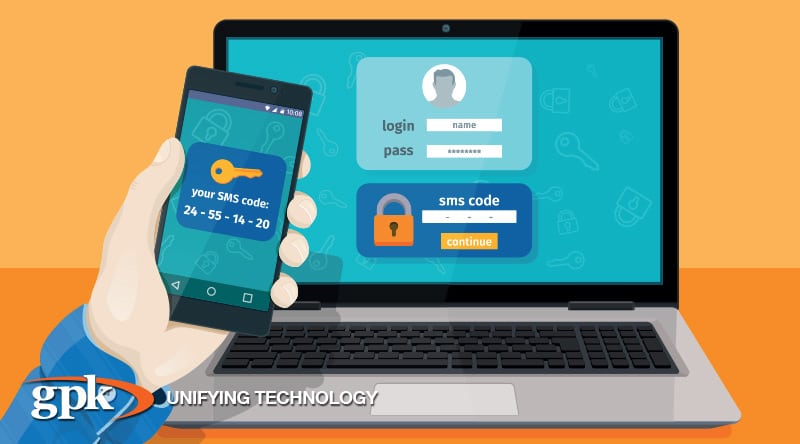
  1. Turn on 2-factor authentication – If you use internet banking, this feature is invaluable – and it’s readily available through most credible banks. This method acts as an extra line of defence for your accounts, by requesting two different pieces of information at login: firstly, your password and then the entry of an automatically generated one-use code. In most cases, all that’s required to start using two-factor authentication is to activate the setting on your account and nominate a mobile number or email account the code can be sent to.
  1. Use a password manager – If keeping track of numerous passwords is an obstacle to better security in your organisation, it’s worth investing in a password manager. This simple tool streamlines password management by needing just one master password to govern the account; for every other account, you need a login to, it generates a highly secure password on your behalf and stores this data in encrypted form. You can then access that password data from your desktop or mobile device whenever you need it, without needing to remember or record the details. There are many free or low-cost password managers available for download, including the highly regarded LastPass.

Every day, we’re living more of our lives online. And when it comes to running a business, we can’t afford to not be online. Poor password control exposes you and your customers to numerous security risks, which could spell disaster for your business’s reputation, performance and profitability. So rather than hope a cyber-attack won’t happen to you, take some simple measures like those outlined above, educate your team, and make password protection a key part of your business process.

If change and meeting your customers’ needs is a constant, doing nothing isn’t an option. Be sure you are partnering with a company with the depth and breadth of expertise you require. Particularly one who can help you navigate end-to-end managed services, cloud, mobile and paperless retail technology. GPK Retail consultant, Cordell Quaine, is available for a no-obligation discussion on how GPK can help you reduce operational costs, manage your IT footprint more effectively and create an exceptional experience for your customers. Contact: Phone 1300 000 475 or email info@gpkgroup.com.au for more information.

 

Device Management: How to Protect Your Company and Your People

We live in an age where almost every business uses some form of mobile technology. It has become an indispensable part of how we communicate, manage processes and provide services to our customers. Yet long before this technology became a business mainstay, it was firmly entrenched in the lifestyle of consumers. The upshot? These consumers are now bringing their devices, usage habits and personal data in the workplace.

If your organisation provides devices to staff or allows them to use their personal device for business purposes (also known as BYOD or Bring Your Own Device) it can open up a series of challenges for your IT team, particularly around data security and personal privacy. These concerns are not new, but they are growing due to an increasingly mobile and often remote workforce, employee turnover, and the rapid pace of technological change.

One of the most practical, versatile and accessible solutions today is mobile device management (MDM). MDM is a cloud-based system that enables your IT team to centrally manage data and have access to that data, plus manage the use of multiple accounts and identities on individual devices.

This approach offers two considerable benefits for business owners. These benefits include:

  1. Improved operational efficiency – Centralised management means faster and more standardised individual and bulk deployment of new and updated devices and apps – so you can channel IT resources towards more strategic projects.MDM also empowers staff to perform a number of tasks independently without waiting for IT help, such as self-activating a new or updated device, downloading approved apps and accessing basic technical support such as password resetting. This means your team members experience less downtime due to technical changes, and feel more in control of their performance.
  2. Improved data security – Mobile Device Management allows your organisation to maintain high level data security without the need for substantial on-the-ground resources.Your IT team can set clear parameters for each user on access and editing rights to every aspect of your system – including documents, apps, settings and notifications – with the flexibility to make modifications remotely when circumstances change.

    MDM also enables your devices to be protected by device level encryption and software that automatically detects security breaches. Threats ranging from unauthorised wi-fi access and lost or stolen devices to malware and jailbreaking can be managed swiftly and thoroughly by pre-defined measures like remote lock, device wipe or quarantine.

As organisations, the workforce and technology evolve, new opportunities and new challenges will arise for business owners. Agility and responsiveness to change, whether that be a rapid expansion, a new policy rollout or the transition from in-house to remote teams, are fundamental to success. Managing scenarios like this in the midst of a growing BYOD culture (nearly 60% of organisations permit employees to use their personal device for work) requires a flexible approach. Mobile Device Management is a practical solution that protects both employer and employee, allowing business owners and their IT teams to focus on strategic growth, rather than day to day management and troubleshooting.

If change and meeting your customers’ needs is a constant, doing nothing isn’t an option. Be sure you are partnering with a company with the depth and breadth of expertise you require. Particularly one who can help you navigate end-to-end managed services, cloud, mobile and paperless office technology. GPK consultant, Ben Holian, is available for a no obligation discussion on how GPK can help you reduce operational costs, manage your IT footprint more effectively and create an exceptional experience for your customers. Contact: Phone 1300 000 475 or email info@gpkgroup.com.au for more information.

0%